Showing posts with label Software. Show all posts

Friday, July 24, 2015

Top 10 Freeware Downloads

 Image result for new software
 1.
AVG AntiVirus Free 2015 v15.0.6086  
Use the AVG Anti-Virus System to reliably protect your computer.

 2.
Microsoft Games for Windows - LIVE 3.5.50.0  
Full version of Games for Windows - LIVE v3.5.

 3.
avast! Free Antivirus 10.3.2223  pick
Free antivirus for home use - scans for viruses, worms and Trojans.

 4.
Free Ringtone Maker Portable 2.4.0.2598  pick
Portable tool to make your own ringtones from MP3s.

 5.
Microsoft Security Essentials (32-Bit) 4.8.0204.0  pick
Protect your PC against viruses, trojans, and spyware with real-time protection.

 6.
Stress Relief 2.0  pick
Virtually pound your computer into submission with multiple weapons.

 7.
Sonic Games 1.0  
A nice collection of Sonic games.

 8.
Readon TV Movie Radio Player 7.6.0.0  pick
Watch and listen to thousands of TV, LIVE sports, latest movies and radio channels all over the world.

 9.
LicenseCrawler 1.47.0.825  
Scans the Windows Registry for Windows product keys and other serial numbers and licenses.

 10.
DirectX 9.0c Redistributable June 2010  pick
Advanced suite of multimedia APIs built into Microsoft Windows operating systems.

Tuesday, July 7, 2015

system software

Image result for system softwares
System software is a type of computer program that is designed to run a computer’s hardware and application programs. If we think of the computer system as a layered model, the system software is the interface between the hardware and user applications.
The operating system (OS) is the best-known example of system software. The OS manages all the other programs in a computer.

Other examples of system software and what each does:
  • The BIOS (basic input/output system) gets the computer system started after you turn it on and manages the data flow between the operating system and attached devices such as the hard disk, video adapter, keyboard, mouse, and printer.
  •  The boot program loads the operating system into the computer's main memory or random access memory (RAM).
  • A device driver controls a particular type of device that is attached to your computer, such as a keyboard or a mouse. The driver program converts the more general input/output instructions of the operating system to messages that the device type can understand.
System software and application programs are the two main types of computer software. Unlike system software, an application program (often just called an application or app) performs a particular function for the user. Examples (among many possibilities) include browsers, email clients, word processors and spreadsheets.

Exampls For System Softawre:

1) Microsoft Windows
2) Linux
3) Unix
4) Mac OSX
5) DOS
6) BIOS Software
7) HD Sector Boot Software
8) Device Driver Software i.e Graphics Driver etc
9) Linker Software

10) Assembler and Compiler Software 

Wednesday, May 27, 2015

Viber review: Of all the messaging apps, Viber has the most features


Image result for Viber review: Of all the messaging apps, Viber has the most features
  •     Viber (iOS|Android|Windows Phone) is excellent for messaging and calling your friends for free around the globe and you can even make video calls. You can also use your and your friends' actual phone numbers provided they have the app too.

  •          There are a number of third party messaging apps in the App Store such as WhatsApp Messenger and Kik, which let you message your friends in a similar way. But with free audio and video calls, Viber is the app to choose when you want to avoid long-distance charges, and it has plenty of extras that make it better than most popular third party messaging apps.

  •       The only problem? Not everyone uses it. So that means you're going to have to convince your friends and family to download it too. But if you do, I think you'll be happy with everything it has to offer.

Setting up

  • When you launch the app, you'll need to enter your phone number and give access to your contacts list. For verification, you'll also get a text message with a code you'll need to enter before your account is completely synced to your device.

  • Once you're set up, you can peruse the contact list to see which of your contacts also use Viber and you can invite contacts who don't.

Messaging features

  •     Once you have some people to chat with, you can use Viber like most other messaging apps. You can send text messages, short audio clips, photos and videos from your library, your location, and emoticons.

  •       Sending a message is just like other apps, with balloons for each of the people chatting, and you can set up group texts for up to 100 participants. You can create an audio clip by touching the microphone, then touching and holding a big button in the bottom center to record. It's not quite as elegant as the touch and swipe up method you get with iOS Messages, but it works just fine.

  •      There is a doodle feature, which lets you pick a brush size and color, then draw on the screen to send little doodles to your friends. It's obviously not a crucial feature, but it's a fun addition that lets you add something more to the conversation.


Friday, May 22, 2015

Avast Software Updates


 Image result for avast logo


A feature of most of our programs is their ability to update themselves automatically. If you are connected to the Internet, virus database updates are downloaded and installed automatically without any user action. The availability of a new version is checked when an Internet connection is established, and every four hours afterwards. Update files can also be downloaded from these pages if required e.g. if your computer does not have an Internet connection. Updates are usually released on a daily basis.


Note: No reinstallation of the program is needed for virus database updates!

Update Avast VPS

Avast VPS update for versions 2014 to 2015                            Download

Avast VPS update for versions 5 to 8                                        Download

Avast VPS update for version 4.8.0                                          Download


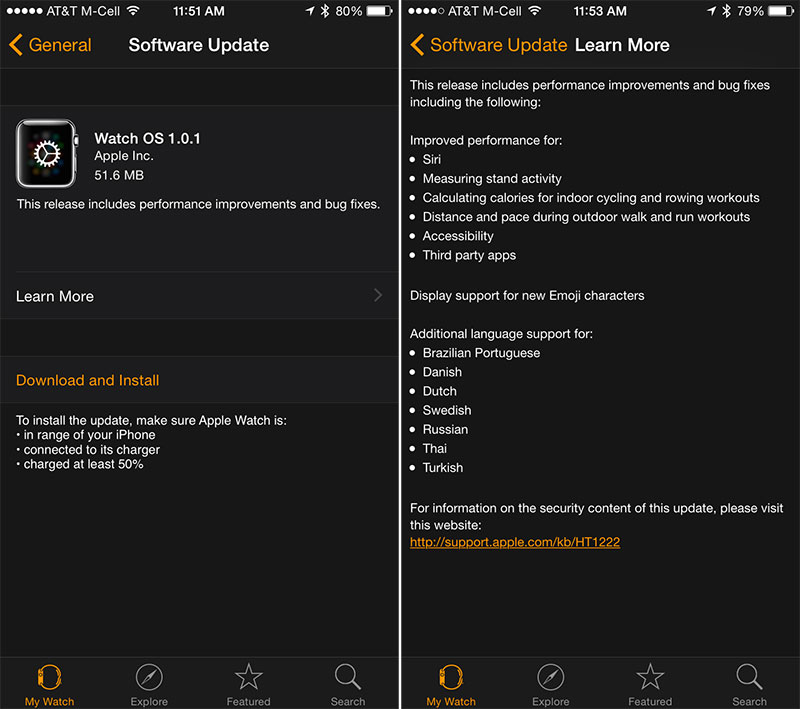
Apple Releases First Apple Watch Software Update With Bug Fixes and Performance Improvements

 watchupdate1


Apple today released the first software update for the Apple Watch, upgrading it to Watch OS version 1.0.1. Released to the public on April 24, the Apple Watch initially shipped with version 1.0 of Watch OS, the operating system unique to the Apple Watch and deeply linked to iOS.

 The new software can be downloaded through the dedicated Apple Watch app on the iPhone by going to General --> Software Update. To install the update, the Apple Watch must be placed on the charger and it must be in range of the iPhone.

Watch OS 1.0.1 includes performance improvements and bug fixes for Siri, measuring stand activity, calculating calories for indoor cycling and rowing workouts, distance and pace during outdoor walking and running workouts, accessibility, and third-party apps. The software update also includes support for new the emojis found in iOS 8.3 and it provides additional language support for Brazilian Portuguese, Danish, Dutch, Swedish, Russian, Thai, and Turkish.

Apple has been steadily shipping Apple Watch devices out to customers, but supplies remain constrained and some Apple Watch orders have not yet shipped out. Customers receiving an Apple Watch shortly after today's update will need to update the software on the device after taking it out of the box.

Tuesday, May 19, 2015

CCleaner 5.05.5176 Software

 https://encrypted-tbn1.gstatic.com/images?q=tbn:ANd9GcR6pgzgsQxTp7lTYwSC1i2j2kB3ZeQ_48d1wep1KO-uRqdzkewU

Probably the most popular freeware cleaner globally with over 1 billion downloads since its launch in 2003. Piriform’s CCleaner is a quick and easy to use program which makes your computer faster, more secure and more reliable. CCleaner removes cookies, temporary files and various other unused data that clogs up your operating system. This frees up valuable hard disk space allowing your system to run faster. Removing this data also protects your anonymity meaning you can browse online more securely. The built in Registry Cleaner fixes errors and broken settings to make your computer more stable. The simple, intuitive UI and rapid but powerful cleaning make CCleaner a favourite among novices and techies alike. Professional, Network, Business and Technician Editions of CCleaner are also available for serious users.

More Secure Browsing
Advertisers and websites track your behaviour online with cookies. Saved passwords, cached data and internet histories make your identity less secure. CCleaner removes these files to make your browsing experience confidential, meaning you are less likely to suffer from identity theft and/or online fraud. The military grade Drive Wiper ensures any data you want to be permanently deleted, stays deleted.

 Go This Link And Download CCleaner 5.05.5176 Software
http://filehippo.com/download_ccleaner


Monday, May 18, 2015

Microsoft announces Office 2016, coming in the second half of 2015


 Image result for Microsoft announces Office 2016, coming in the second half of 2015

At its Windows 10 event yesterday, Microsoft unveiled the touch-optimized version of Office. Today, the company offered more details about that version, and then snuck in another announcement: The next desktop version is under development, it is called Office 2016, and it will be generally available “in the second half of 2015.”
Office 2016, previously referred to as Office 16 (a happy coincidence, as Office 15 was named Office 2013), is right on schedule. The last three versions of the productivity software were all released approximately three years apart, as their names indicate: Office 2007, Office 2010, and Office 2013.
Microsoft said it will have more to share on Office 2016 “in the coming months.” Despite the touch version, Office 2016 “will remain the comprehensive Office experience you’re long familiar with, best suited for a PC with keyboard and mouse,” Microsoft explained.
Microsoft did not reveal any upcoming features it is planning for Office 2016. That said, screenshots and early builds have been leaking since at least September, so the new version has hardly been a secret. The news today is mainly a formality: Office 2013 will be succeeded by Office 2016.

3D CAD Software

 Image result for 3D CAD Software

What is CAD software?

CAD, or computer-aided design and drafting (CADD), is the use of computer technology for design and design documentation. CAD software replaces manual drafting with an automated process.
If you work in the architecture, MEP, or structural engineering fields, you’ve probably used 2D or 3D CAD programs. These programs can help you explore design ideas, visualize concepts through photorealistic renderings, and simulate how a design will perform in the real world. AutoCAD software was the first CAD program, and it is still the most widely used CAD application.
 

3D CAD software innovations

Autodesk’s Digital Prototyping tools help engineers and designers experience their 3D CAD designs virtually, before they’re built. By connecting every phase of your design process through a single digital model, our Digital Prototyping solutions let your teams test and optimize 3D CAD designs, helping to drive innovation, achieve higher quality, and speed time to market.
Our Building Information Modeling (BIM) software gives designers and engineers an integrated way to explore a project’s key physical and functional characteristics digitally. Through the use of an intelligent 3D model to inform and communicate project decisions, our BIM solutions deliver insight and business value for building design, construction, infrastructure, and utilities projects.

Featured 3D CAD software

Whether you design buildings, products, or roads, or you’re learning to transform your designs from 2D to 3D, there’s an Autodesk 3D CAD software product for you.

Tuesday, May 12, 2015

E-Learning System

Image result for e learning images picturesThis e-learning system is designed specifically for social services and is now available for all. It is easy to use so you can create your professional development, or social education and enhance your organization's capacity. The system is available on one or multiple platforms: web, mobile, CD-ROM, DVD, video, TV and radio as blended or stand-alone training.
   
  • Transforms learning programs into highly interactive training.
  • Adds interactive scenarios to your suite of existing online training.
  • Transforms your learning content into an online environment.
  • Develops new media-rich modules and courses in-house.
  • Delivers blended or stand-alone web training via computer and mobile.
  • Instigates change, growth and add working capacity for individuals, organizations and community